
Working Inside An Interview: Transcript, Notes, and Analysis
Once yo open an interview, this is where your real work happens.
This view is designed to help you move from:
👉 raw conversation to
→ structured understanding
→ actionable insights
Everything you need — transcript, notes, analysis, and insights — lives in one place.
Understanding the Three Core Views
At the top of the interview, you can switch between:
- Transcript
- Notes
- Both
Each serves a different purpose — and understanding the difference is critical.
Transcript: What Was Said
The Transcript is the system-generated record of the conversation.
It comes from your uploaded audio or video.
Manage Transcript
In the Transcript view, you can use the Manage Transcript menu to manage transcript-related actions.
Available options include:
-
Copy Transcript
Copy the full transcript text.
-
Edit Transcript
Edit the transcript if speaker text or wording needs correction.
-
Speaker Labels
Manage or update speaker labels.
-
Auto Scroll Enabled
Keep the transcript automatically scrolling with the audio playback.
This helps you review, correct, and manage transcript content directly from the interview workspace.

What this is for:
- Reviewing the exact conversation
- Understanding context and tone
- Extracting evidence
👉 This is your source of truth
Nothing is interpreted here — it’s just what was actually said.
Split Transcript and Analysis
If AI analysis has been generated, you can split the Transcript and Analysis panels side-by-side.
This allows you to:
- Read the original transcript while reviewing AI insights
- Compare evidence directly against the AI interpretation
- Navigate the conversation without leaving the analysis
Click the Analysis button to open the Analysis panel side-by-side with the transcript. This allows you to review the original conversation while simultaneously viewing AI-generated summaries, insights, and learning brief.

Notes: What You Think Matters
The Notes section is your workspace for interpretation and documentation.
This is where you:
- Write observations
- Capture reactions or patterns
- Follow interview templates
- Add structured notes during or after interviews
What you can do:
- Use formatting tools
- Create headings and lists
- Add checkboxes
- Insert tables or structured content
- Organize your notes visually
👉 Notes are your interpretation layer.
Unlike transcripts, notes reflect your thinking and synthesis.

Generating Notes Analysis
After writing or pasting notes into an interview, you can run AI analysis on those notes to extract key insights, themes, observations, and evidence.
Notes Analysis is useful when your interview notes contain meaningful content from the conversation and you want the platform to help identify patterns or insights from those notes.
You can generate Notes Analysis in two ways:
Option 1: Generate Notes Analysis from the Interview Details Page
- Open the interview.
- Go to the Notes view.
- Add or review the notes you want to analyze.
- Click Generate Analysis in the top-right area of the interview.
- Select Note Analysis.
- In the confirmation modal, click Confirm.
The platform will begin analyzing the notes and generate analysis based on the note content.

Option 2: Generate Notes Analysis from the Interviews Table
You can also generate Notes Analysis directly from the Interviews table.
- Go to the Interviews page.
- Find the interview you want to analyze.
- In the Notes column, click Analyze.
This starts Notes Analysis for that interview without needing to open the full interview details page first.

Important Note
Notes Analysis should be run only when your notes contain actual interview content, observations, or meaningful findings.
If the notes only contain interview questions, template prompts, or very limited content, the platform may not have enough information to generate a useful analysis.
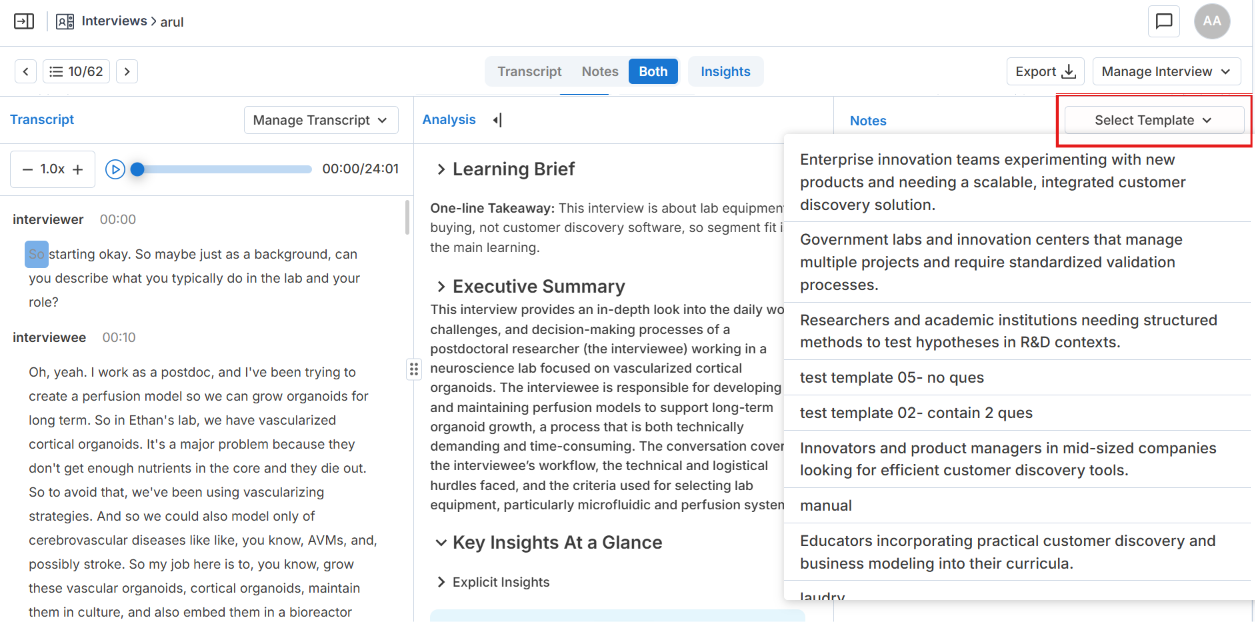
Changing the Interview Template from Notes
Inside the Notes view, you can update the interview template using the template dropdown.
To change the template:
- Open the Notes view.
- Click the interview template dropdown.
- Select the template you want to apply from the list.
Use this when:
- The wrong template was assigned.
- You want to use a different question structure.
-
You need to align notes with a new interview framework.
Split Notes and Analysis
If AI analysis is available, you can also split the Notes and Analysis panels side-by-side.
This helps you:
- Compare your own observations with AI-generated findings
- Write notes while reviewing insights
- Refine your interpretation using both human and AI perspectives
If analysis has not been generated, the split option will not be available.
Both View: Where the Work Happens
The Both view shows Transcript + Notes side by side.
This is the most powerful mode.
You can:
- Read what was said
- Write notes at the same time
- Connect thinking directly to evidence
👉 This is where good analysis actually happens

Split Layouts in Both View
Inside the Both view, you can expand or split panels to customize your workspace.
This allows you to:
- Open Analysis beside the Transcript
- View Notes beside Analysis
- Focus on the information most relevant to your review process
This flexibility is especially useful during deep interview analysis.

Insights Panel
The Insights panel is where you create, review, and manage interview insights.
Unlike Transcript, Notes, and Both, the Insights section does not function as a completely independent workspace. Instead, it opens alongside the other views so you can work directly with interview evidence while creating insights.
The Insights panel can be opened together with:
- Transcript
- Notes
- Both view
This allows you to:
- Select evidence from the transcript or notes
- Create insights without leaving your workspace
- Review existing insights while reading the interview
- Connect evidence directly to Canvas hypotheses

What You Can Do in the Insights Panel
Inside the Insights panel, you can:
- Create manual insights
- Review AI-generated insights
- Link insights to hypotheses
- Add comments
- Apply tags
- Set priority levels
- Review existing evidence connected to the interview
How to Create an Insight
- Select text from the Transcript or Notes
- Open the Insights panel
- Add:
- A comment
- Tags
- Priority
- Linked hypotheses
- Click Save
👉 Insights transform raw interview evidence into structured learning connected to your Canvas.
What Makes a Good Insight
A strong insight:
- Is based on actual evidence (not opinion)
- Connects to a hypothesis
- Can support or invalidate an assumption
👉 Insights are how interviews impact your Canvas
Understanding the Analysis Section
If analysis has been generated, you’ll see it in the Analysis panel.
This may include:
- Learning Brief → a concise summary of the key learning from the interview
- Executive Summary → a high-level overview of the conversation
- Key Insights at a Glance → important findings from the interview
- Explicit Insights → direct statements from the participant
- Implicit Insights → underlying meaning or inferred needs
- Themes → patterns across the conversation
Collapsible Analysis Sections
Analysis sections can be expanded or collapsed by clicking the section heading.
This allows you to:
- Open only the sections you want to review
- Hide sections that are not needed
- Move through long analysis faster
- Keep your workspace cleaner during review
The system saves your last expanded or collapsed state, so the analysis view stays consistent when you return to the interview.
Navigating Between Interviews
At the top of the page, you can move between interviews without going back.
You can:
- Go to the previous interview
- Go to the next interview
- See your position in the list (e.g., 6 / 38)
👉 This makes reviewing multiple interviews much faster

How This All Connects
Inside one interview, you are doing multiple layers of work simultaneously:
Understanding reality
→ Transcript
Interpreting meaning
→ Notes
Structuring evidence
→ Insights
Accelerating synthesis
→ AI Analysis
The platform keeps all four connected in one workspace so your discovery process remains traceable and evidence-based.
Key Takeaway
This view is not just for reading interviews.
It’s where:
👉 raw conversations become structured insights
👉 insights connect to hypotheses
👉 hypotheses get validated or invalidated
If you use this space well, your entire discovery process becomes:
- More rigorous
- Less biased
- Much easier to scale